Stop Typing Supplier Bills — Forward the Email and Let AI Draft the Voucher.
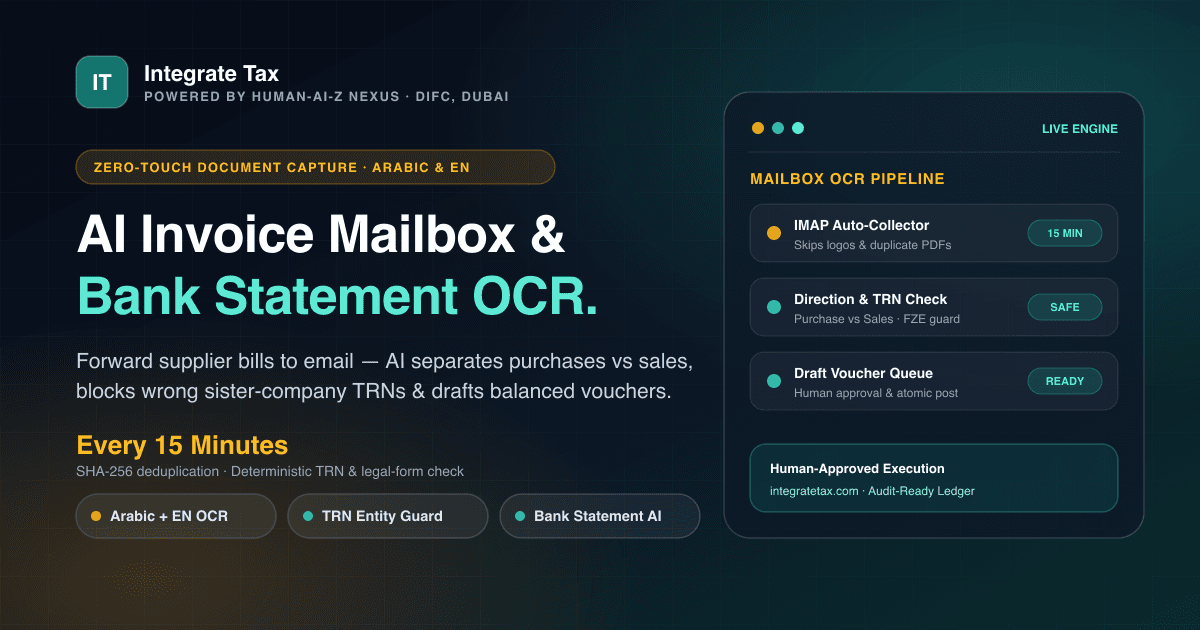
Connect your company’s accounts email via IMAP and let Integrate Tax collect PDF and image invoices every 15 minutes. Our deterministic TRN & legal-form guard blocks wrong sister-company bills, separates purchases from your own sales invoices, and queues balanced draft vouchers — paired with AI Bank Statement voucher automation.
- Every 15 Min
- Automatic IMAP collection & SHA-256 deduplication
- Arabic + EN
- Reads bilingual GCC invoices & filters email noise
- Zero Wrong Entity
- Matches printed TRN & legal form (FZE vs FZ-LLC)
Why basic OCR scanners still create hours of cleanup work
Generic OCR tools blindly scan email signature logos, mix up sister companies, duplicate resent PDFs, and post errors straight into your books.
Sister-Company & Wrong-Entity Protection
OCR reads any invoice sent to the inbox — accidentally booking a sister entity’s expense into the wrong company.
Deterministic server verification compares printed tax numbers and legal forms (e.g., FZE vs FZ-LLC vs Ltd) against the active company — automatically blocking mismatched bills.
Purchase vs Own Sales Invoices
Separate manual uploads required if another billing tool emails your own sales invoices into the same accounts inbox.
Optional Auto-Direction switch detects whether your company is the Buyer (routes to Purchases) or Seller (routes to Sales OCR Preview) with strict server-side posting guards.
Duplicate PDFs & Signature Noise
Resent supplier emails create duplicate bills, and tiny email logo PNGs clutter the inbox.
SHA-256 file deduplication prevents re-collecting identical PDFs, tiny embedded signature images are skipped, and bilingual invoice-word rules ignore non-invoice emails cleanly.
Bank Statements to Vouchers
Manually keying hundreds of bank statement lines every month.
Built-in AI Bank Statement import maps statement rows to draft bank vouchers and reconciles against your General Ledger.
From supplier email attachment to audited General Ledger entry
Connect IMAP Mailbox & Collection Rules
Configure IMAP host, sender allowlist, bilingual invoice keywords (Arabic & English supported), and choose Manual or Automatic OCR mode with a daily safety cap.
Automatic Collection & Smart Filtering
Every 15 minutes (or on-demand via Collect Now), the worker checks new emails, ignores signature icons and non-matching messages with explicit reasons, and deduplicates PDFs via SHA-256.
AI OCR + TRN & Entity Safeguard
Up to 5 PDF pages per source (max 10 MB) are read cleanly — never silently dropping pages. Extracted supplier TRNs, line items, amounts, and taxes are staged in separate draft tables outside the live ledger.
Review Drafts & Import with Atomic Rollback
Confirm cost center, accounts, and tax codes in Draft Vouchers, then click Import Selected. Missing accounts roll back cleanly, original attachments link to posted & WHT vouchers, and nothing can be double-imported.
Built for real GCC finance teams — not fragile demos
Vendor Invoice Mailbox Intelligence
- Works with Gmail (App Password) and standard IMAP servers; Arabic & English keyword matching
- Automatic background queue — closing your browser never cancels running OCR jobs
- Full Discard / Restore audit log with user, timestamp, and reason (nothing silently deleted)
- Source attachments automatically carried onto posted Purchase, Sales & WHT vouchers
Complete AI Entry Ecosystem
- AI Bank Statement PDF/Excel → Draft Bank Vouchers & reconciliation
- Parallel AI Trial Balance & Chart of Accounts auto-mapping for fast onboarding
- Camera receipt & invoice capture inside the HUMAN-AI-Z Android mobile app
- 7-engine pre-filing forensic check validates every imported voucher before tax filing
Pure software automation — with strict server-side permissions & human sign-off.
- Draft vouchers live in isolated staging tables — completely excluded from GL, stock, and tax returns until approved
- No vendor, product, or inventory master record is auto-created by background OCR
- Server-side permission gates verify active company membership, cost center, and purchase/sales rights on every job
- Atomic batch posting ensures partial or unbalanced voucher imports roll back cleanly
Key implementation & compliance answers.
Want to inspect this exact workflow live with our DIFC product team?
Does automatic OCR post vouchers into my General Ledger without my approval?+
Never. Automatic mode only extracts invoices into Draft Vouchers staged outside your General Ledger, inventory, and tax returns. An authorized accountant must review and click Import Selected before anything posts.
What happens if a supplier emails an invoice addressed to our sister company?+
Integrate Tax verifies the printed tax registration number (TRN) and legal form (such as FZE vs FZ-LLC vs Ltd) against your active ERP company and blocks mismatched sister-company invoices from posting.
Can the mailbox process both Arabic and English invoices?+
Yes. Both the email keyword matcher and the AI OCR extraction engine support Arabic and English documents cleanly.
What if the same PDF invoice is forwarded twice by accident?+
Every attachment is fingerprinted with SHA-256 deduplication so identical PDFs are never collected twice, and duplicate invoice numbers per supplier/customer are blocked at import.
Saudi ZATCA & Zakat
Saudi ZATCA Phase 2 clearance, VAT 15%, WHT returns, Zakat Form 10 Excel export with mixed-ownership splits, and HRSD/SAMA WPS payroll.
Oman OTA Tax & Form 14
Oman OTA VAT 5%, one-click OTA Taxpayer Checklist .xlsx, monthly WHT, CIT Form 14 with IAS 12 deferred tax, and Oman WPS/SPF/Gratuity payroll.
Bahrain NBR VAT & SIO
Bahrain NBR VAT Return mapped box-by-box across Boxes 1(a)–18 plus automated Bahrain SIO payroll contribution rates scheduled through 2028.